Kia Sportage: Intelligent Speed Limit Assist settings
Intelligent Speed Limit Assist uses information from the detected road sign and navigation system to inform the driver of the speed limit. Also, the function helps the driver to maintain within the speed limit of the road.
CAUTION
- Intelligent Speed Limit Assist may not operate properly if the function is used in other countries.
- Update navigation system regularly for Intelligent Speed Limit Assist to operate normally.
Detecting sensor
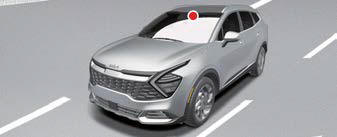
Front view camera
Refer to the picture above for the detailed location of the detecting sensor.
CAUTION
For more precautions related to the camera sensor, refer to "Forward Collision- Avoidance Assist (FCA) (Front Camera Only) (if equipped)"
Intelligent Speed Limit Assist settings
Speed Limit
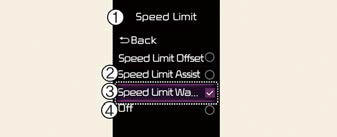
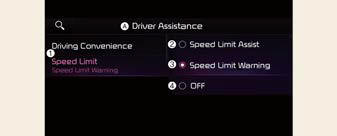
A: Driver Assistance
- Speed Limit
- Speed Limit Assist
- Speed Limit Warning
- Off
With the vehicle on, select or deselect Settings? Driver Assistance ? Speed Limit from the User Settings menu or select or deselect Settings? Vehicle ? Driver Assistance ? Speed Limit the infotainment system to set whether or not to use each function.
- If Speed Limit Assist is selected, Intelligent Speed Limit Assist will inform the driver of speed limit. In addition, Intelligent Speed Limit Assist will inform the driver to change set speed of Manual Speed Limit Assist or Smart Cruise Control (If equipped) to help the driver stay within the speed limit.
- If Speed Limit Warning is selected,
Intelligent Speed Limit Assist will
inform the driver of speed limit. In
addition, Intelligent Speed Limit Assist
will warn the driver when the vehicle is driven faster
than the speed limit.
Manual Speed Limit Assist or Smart Cruise Control (If equipped) set speed will not be automatically adjusted. The driver should adjust the speed manually.
*If Off is selected, Intelligent Speed Limit Assist will turn off.
Speed Limit Offset
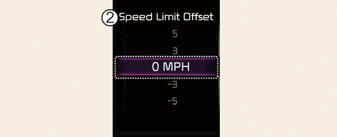
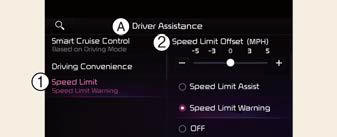
A: Driver Assistance
- Speed Limit
- Speed Limit Offset (mph)
With the vehicle on, when Settings? Driver Assistance ? Speed Limit ? Speed Limit Offset is selected, from the User Settings menu or Settings? Vehicle ? Driver Assistance ? Speed Limit ? Speed Limit Offset is selected from the infotainment system, the Speed Limit Offset can be changed. Speed Limit Warning and Speed Limit Assist will operate by applying the Speed Limit Offset setting to the detected speed limit.
WARNING
- For your safety, change the Settings after parking the vehicle at a safe location.
- Intelligent Speed Limit Assist warns the driver when driving speed exceeds the speed at which the set Offset is added to speed limit. If you want Intelligent Speed Limit Assist to warn you immediately when the driving speed exceeds the speed limit, set the offset to 0.
- Depending on the instrument cluster specifications or theme, images or colors may be displayed differently.
READ NEXT:
 Intelligent Speed Limit Assist operation
Intelligent Speed Limit Assist will warn
and control the vehicle by 'Displaying
speed limit', 'Warning overspeed' and
'Changing set speed'.
NOTICE
Intelligent Speed Limit
Intelligent Speed Limit Assist malfunction and limitations
Intelligent Speed Limit Assist malfunction
A: Check Speed Limit Assist system
When Intelligent Speed Limit Assist is not
working properly, the warning message
will appear on the cluster for se
SEE MORE:
Operating high beam
Operating high beam
To turn on the high beam headlamp:
Push the lever away from you.
The lever will return to its original
position.
The high beam indicator will light
when the headlamp high beams are
switched on.
WARNING
High beams
Do not use high beam when there are
oth
Output Speed Sensor
Description and Operation
Description
The output speed sensor is a vital unit that measures the rate of rotation of
the transaxle's turbine shaft and output
shaft, and delivers the readings to the TCM. The sensor provides critical input
data that's used in feedback control,
dam
Content
- Home
- Kia Sportage - Fifth generation (NQ5) - (2022-2026) - Owner's Manual
- Kia Sportage - Second generation (JEKM) (2005-2015) - Body Workshop Manual
- Kia Sportage Third generation (SL) - (2011-2016) - Service and Repair Manual
- Sitemap
- Top articles
