Kia Sportage: Ignition Switch Assembly
Repair procedures
Inspection
1. Disconnect the ignition switch connector (B) and key warning switch connector (A) from under the steering column.
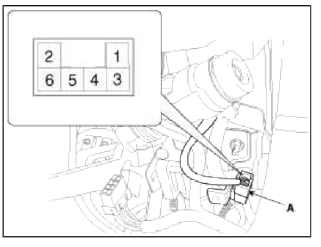

2. Check for continuity between the terminals.
3. If continuity is not specified, replace the switch.

Removal
1. Disconnect the negative (-) battery terminal.
2. Remove the steering column upper and lower shrouds. (Refer to the ST group - "Steering column").
3. Remove the ignition switch (A) after disconnecting the 6P connector (B).

4. Remove the key warning and immobilizer connector (A).

5. Remove the key illumination cover.
6. If it is necessary to remove the key lock cylinder (A), remove the key lock cylinder after pushing lock pin (B) with key ACC.

Installation
1. Install the key lock cylinder.
2. Install the illumination cover.
3. Install the key warning and immobilizer connector.
4. Install the ignition switch.
5. Install the steering column shrouds and crash pad lower panel.
READ NEXT:
 Back View Camera System
Components and Components Location
Component Location
Back view camera
ECM mirror
Schematic Diagrams
Circuit Diagram
Back view camera connector
Power
Video (+)
Gr
General Information
Specifications
Specifications
NOTE
O.D. : Outer Diameter
I.D. : Inner Diameter
Specification (ESC)
Service Standard
Tightening Torques
Lubricants
Special Service Tools
&nbs
SEE MORE:
General Service Information
Protection Of The Vehicle
Always be sure to cover fenders, seats, and floor areas before starting work.
CAUTION
The support rod must be inserted into the hole near the edge of the hood
whenever you inspect the engine
compartment to prevent the hood from falling and causing possible injury.
Disassembling spot welded area
Most body parts are spot welded. In order to disassemble the damaged area, it
is best to disassemble the spot
welded area from the body frame using a spot cutter or candle type edge drill
bit. Do not use a drill bit with a tapered
edge. Center punch middle of spot weld to insure the entire spo
Content
- Home
- Kia Sportage - Fifth generation (NQ5) - (2022-2026) - Owner's Manual
- Kia Sportage - Second generation (JEKM) (2005-2015) - Body Workshop Manual
- Kia Sportage Third generation (SL) - (2011-2016) - Service and Repair Manual
- Sitemap
- Top articles
